Why No Setup Is Perfect for Anyone
A pro setup is a strong base, not the final answer. Here is why your driving style changes the balance, and how to make a setup yours.

You download a setup, you go out, and it fights you. The car is nervous where you expected it planted, or it will not turn where you expected it to.
The setup is not bad and you are not driving it wrong. It was built for a car and a track, not for your hands, and that last part is what the Setup Optimiser does for you.
Why Is Even a Pro Setup Only a Base?
A GO setup is built by pros, so the base is already a good one: balance, tyres, ride height and gearing, all right for the circuit and the conditions. The car is quick before you touch anything.
What it cannot know is you. It does not know whether you brake in one hit or squeeze the pedal, whether you wait for the car to settle or turn it in early.
The lap time attached to that setup was driven by somebody whose hands are not yours.
How Does the Setup Optimiser Work?
You drive, you come back into the app, and you tell it what the car did. It handles the rest.
The Four Questions
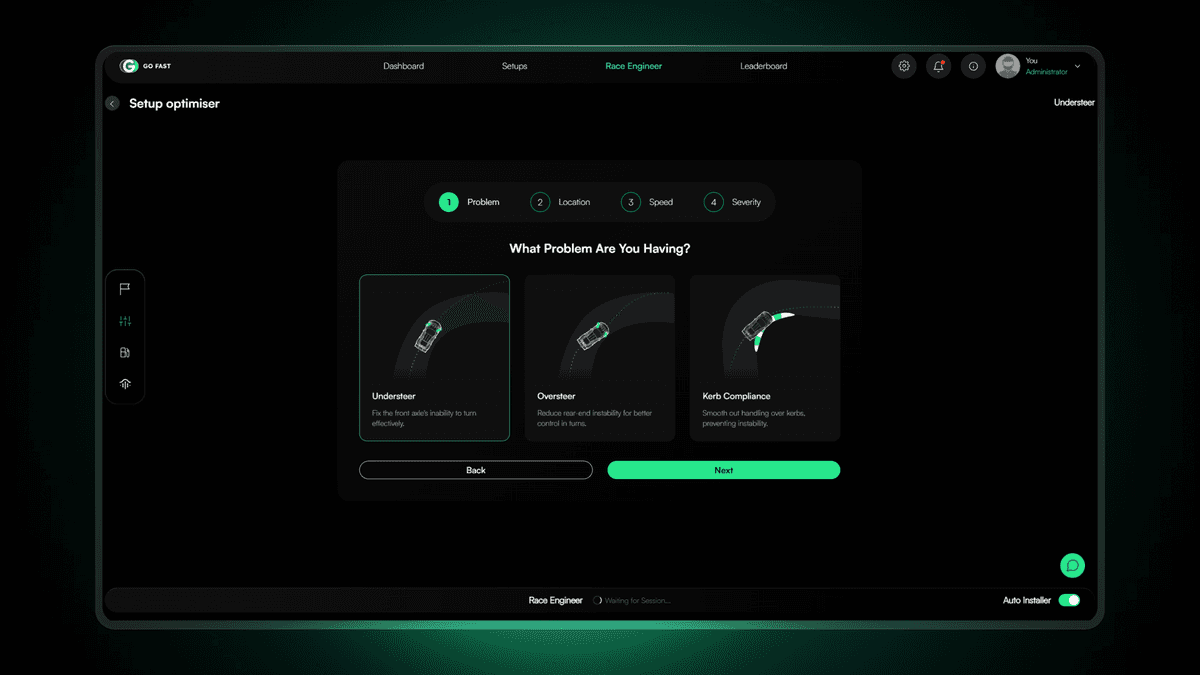
Step 1
Understeer, oversteer, or kerb compliance.
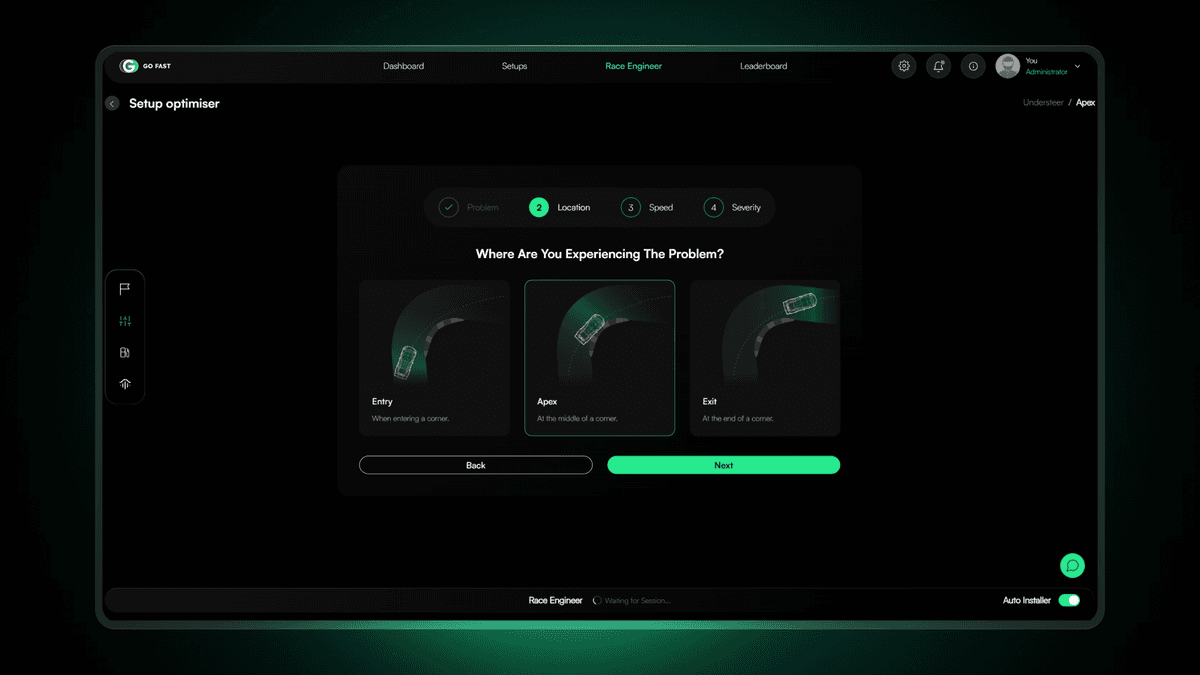
Step 2
Corner entry, mid-corner, or corner exit.
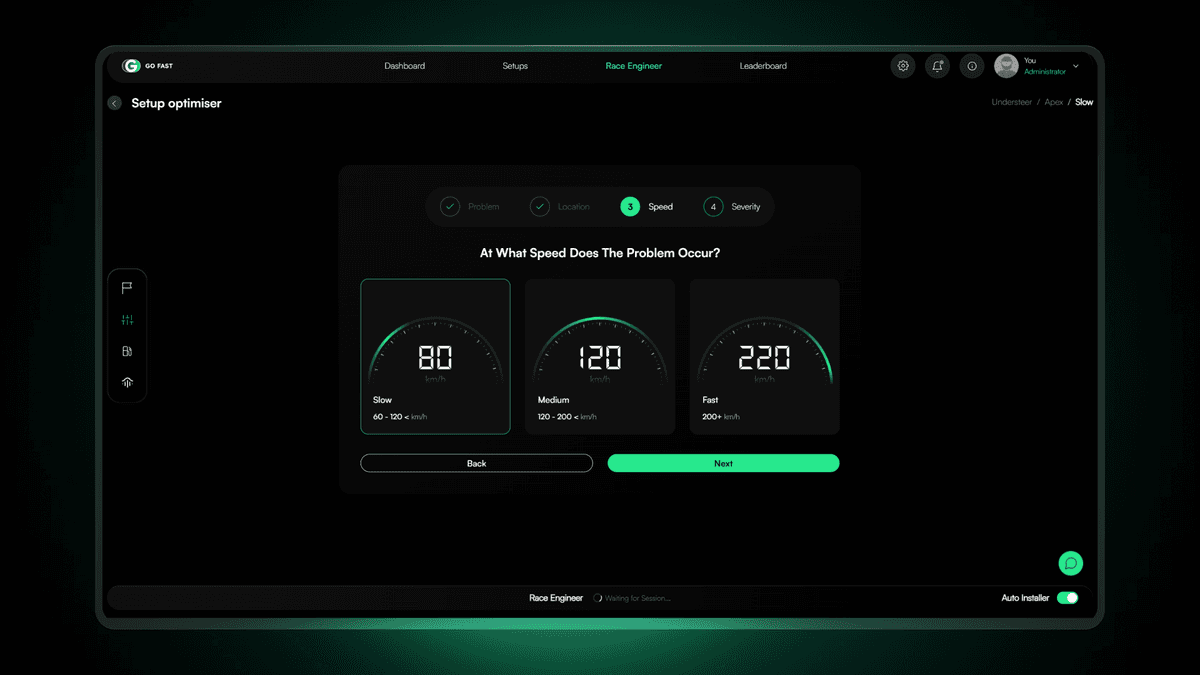
Step 3
Slow, medium, or fast corners.
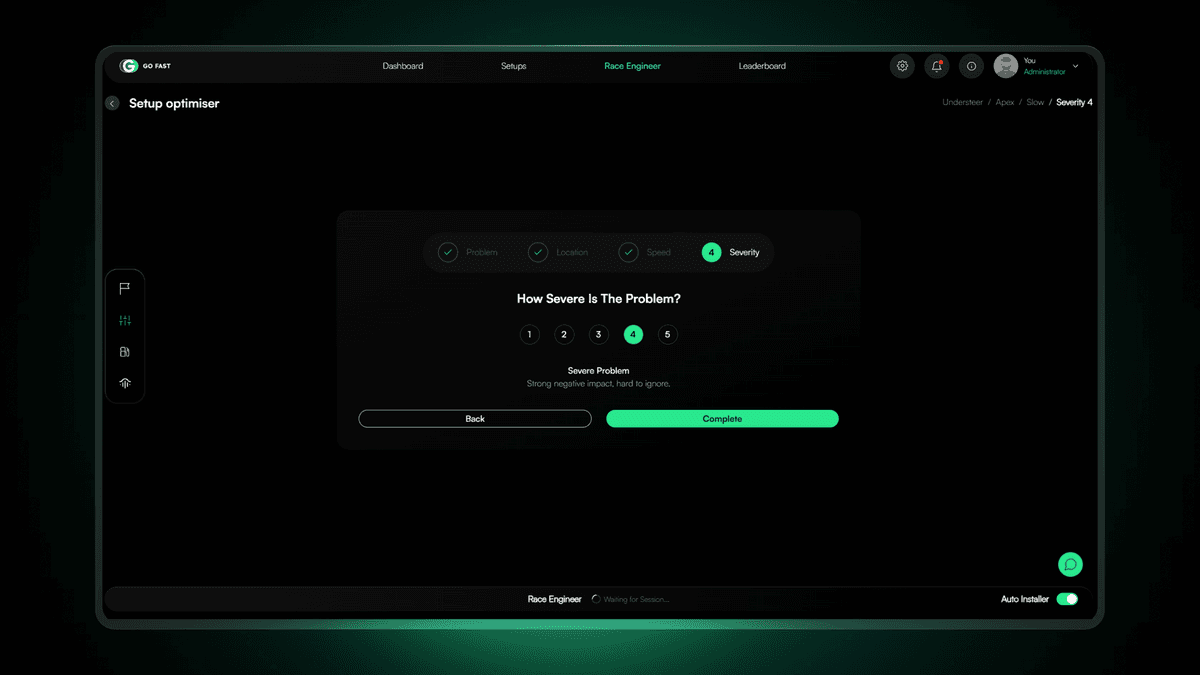
Step 4
One to five.
That is the whole input. No values, no spring rates, no telemetry to read.
GO Fast already knows the car and track you are on and the exact setup you are running, so those four answers are enough to build you a new one.

The one to five is the part people underrate. It decides how big the change is, from a nudge to a proper move, so the fix matches how much the problem is costing you.
How Does the New Setup Reach Your Game?
On Assetto Corsa Competizione and Le Mans Ultimate, GO Fast writes it straight into your setup folder. You come back to the garage screen, load it and go out.
iRacing does not allow that, so instead you get the exact values to change and you enter them yourself in the garage. Same setup at the end of it, one more step to get there.
Those three sims are the ones the Optimiser covers.
Why Does Your Style Decide the Balance?
The closer you drive to the limit, the more your inputs shape the car. A driver who brakes hard and straight, then releases and turns, is asking for stability. A driver who carries the brake deep into the corner is asking the front to keep working while the rear goes light.
Same setup, opposite requirements, and neither of them can use the other's answer.
What Does It Feel Like When It Works?
Once the changes are in, the car stops doing random things. It goes where you put it, it does what you asked, and you are not fighting it any more.
The lap time follows on its own. You are comfortable, so you are quicker, and it holds for a whole stint instead of turning up once.
Then, when the car is no longer the problem, come back into GO Fast with Neura and put yourself against someone quicker: a pro lap, a friend, or the community. With the setup sorted, whatever is left is you, and that is the part worth working on.
What About Fixed Setup Series?
In fixed setup series it goes the other way: the car will not adapt to you, so you adapt to it, and everyone on the grid is doing that with the same setup.
What is still yours is ABS, traction control and brake bias, and GO Setups has values for those. Open GO Fast, go to the Setups area, pick Fixed Setups in the left sidebar and search your car and track.
Le Mans Ultimate only, because it is the one sim where those fixed values actually make a difference.
The Short Version
FAQ
It works from your feedback, in four questions. What the problem is, understeer, oversteer or kerb compliance. Where it happens, corner entry, mid-corner or exit. At what speed, slow, medium or fast corners. And how bad it is, on a scale of one to five. GO Fast already knows your car and track combo and the exact setup you are running, so it builds a new setup from those answers.
iRacing, Assetto Corsa Competizione and Le Mans Ultimate.
On Assetto Corsa Competizione and Le Mans Ultimate, yes. GO Fast writes the setup straight into your setup folder, so you load it in the garage and go out. iRacing does not allow that, so instead GO Fast gives you the exact values to change and you enter them yourself.
No. You answer four questions about what the car is doing and where. Working out which value to move, and by how much, on that car and that track, is the part the Optimiser does.
How far the adjustment goes. A low number nudges the car, a high one moves it properly, so the change is sized to how much the problem is actually costing you.
GO Setups provides the ABS, traction control and brake bias values, and you find them in GO Fast under Setups, Fixed Setups in the left sidebar, by searching your car and track. That covers Le Mans Ultimate, the one sim where the fixed values make a real difference.