How to Read Your Brake Trace
Your brake trace shows exactly how you brake. Learn to read it and find time in the one place most drivers lose it.

Most of the time you lose in a corner is gone before the apex, and your brake trace shows where. It is the most honest graph in sim racing: how fast you got on the pedal, how hard, and how you let it go.
Two drivers can hit the same peak pressure and be nowhere near each other on the exit. The peak was never the story. The shape is.
What Is a Brake Trace Showing You?
How hard you are pressing the brake, from the first touch to the moment you let it go.
The line has three parts: the rise to maximum pressure, the peak, and the release toward the apex. They go wrong on their own, which is why peak pressure alone tells you almost nothing. A trace can have a textbook peak and a terrible release.
What Does Good Braking Look Like?
Firm and early to maximum pressure, then one clean taper all the way to the apex. Here are both, your trace in red against a dotted reference lap.
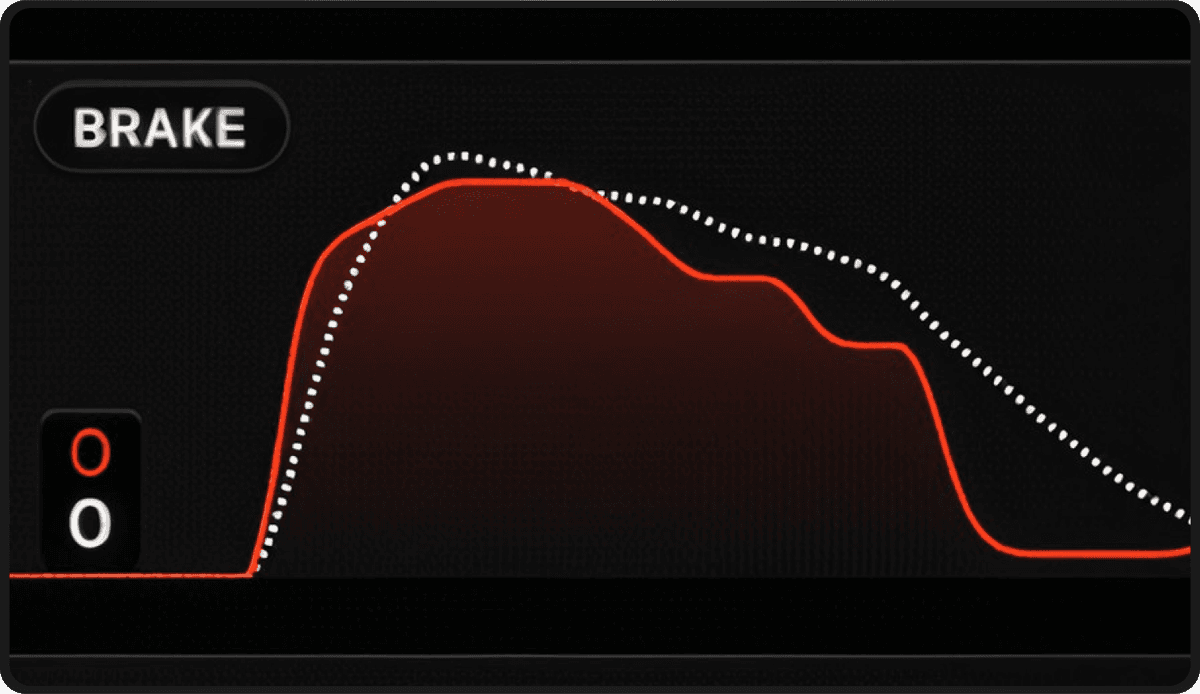
What it should not look like
The peak matches the reference, then the pressure comes off in stages. Every step hands grip back before the car has finished turning.
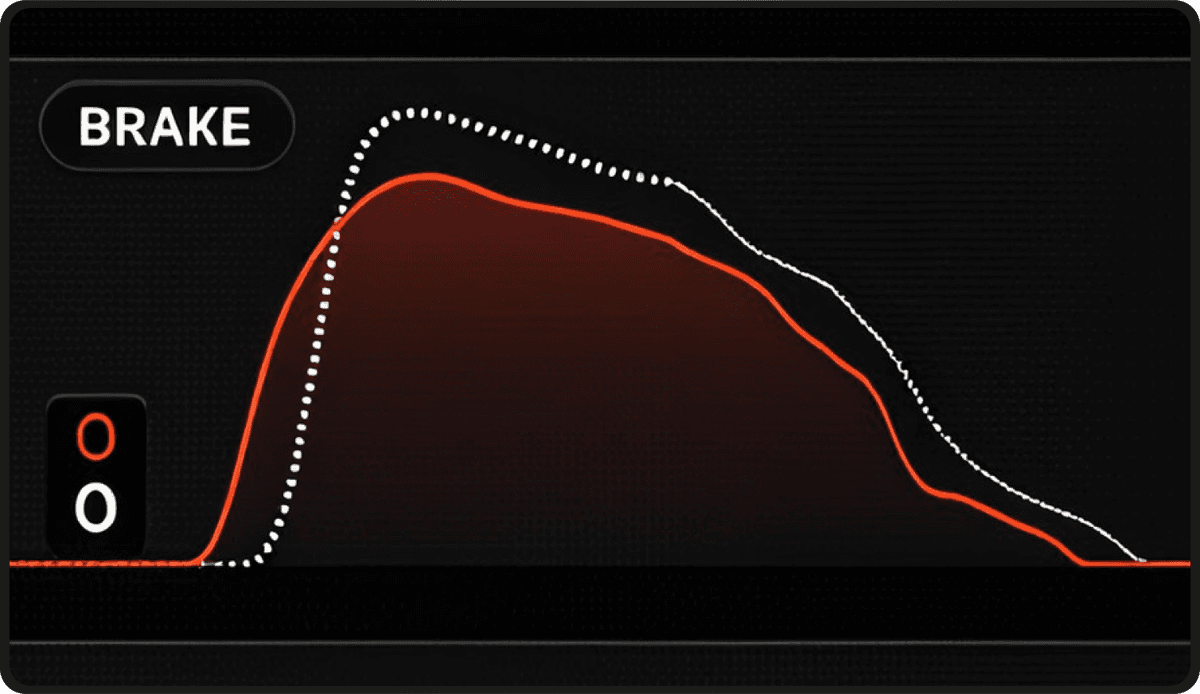
What you are aiming for
Hard and early to maximum pressure, then a single smooth release all the way to the apex, with no flat section and no steps.
Why Do You Brake All the Way to the Apex?
Because the brake is not only there to slow you down. While you are on it, the weight sits on the front tyres, and that weight is what gives the front the grip to turn.
Carry a little brake to the apex and the nose keeps biting. Let it all go at once and the front goes light and stops turning.
So the release is not you finishing with the brake. It is you handing grip from braking to turning, and that trade is what the whole graph is really about.
How Do You Fix It Over a Session?
One zone at a time, and in two places: live on track, then properly in the pits.

GO Setups builds the pro reference laps, and the GO Fast Overlays put your delta to one of them on screen while you drive. Once you are in, Neura picks up where they left off.
You can also run against a friend or the community, which is often more useful on a braking zone. A driver close to your pace shows you a change you can make tonight.
Reading Your Brake Trace in Short
FAQ
A graph of your brake pressure through a braking zone. The higher the line, the harder you are pressing, and the shape shows how you build and release it.
Because the brake does more than slow you down. While you are on it the weight sits on the front tyres, and that weight gives the front the grip to turn. Carry a little brake to the apex and the nose keeps biting. Release it all at once and the front goes light and stops turning.
A firm, fast rise to maximum pressure early in the zone, then one smooth taper off as you add steering, with no flat section and no steps. That clean release is trail braking done properly: as the fronts are asked to turn, they are asked to stop less.
It shows up as a hard, late spike: a near-vertical rise starting too far into the zone, then high pressure held deep into the corner to make up the lost metres. You miss the apex and lose the exit. Start the zone earlier and keep the same firm hit.
Yes. The GO Fast Overlays put your inputs and your delta to the reference on screen, so you can see whether you are braking like the reference in that zone and try something different at the next one.
A pro reference lap built by GO Setups shows you the ceiling, but a friend or a community lap close to your own pace is often more useful on a braking zone, because the difference is one change you can make tonight rather than a whole technique away.